A few days ago, I was working with on my side project gogetcv.com, suing a coding agent (OpenCode) and and noticed something uncomfortable.
It opened my appsettings.dev.json.
These was LLM API keys for different providers and I had to rotate all of them. It hit me, the normal local development config file that almost every project has is not safe att all anymore.
For years, this was more or less fine:
- .env
- .env.dev
- appsettings.Development.json
- appsettings.dev.json
- …
We told ourselves:
“It is gitignored.”
“It is only local.”
“It is just for development.”
But with autonomous coding agents, this assumption is weaker.
Because when an agent reads a file, it is not the same as you reading a file.
When you read a secret locally, it stays mostly on your machine. When an agent reads it, it can become part of the prompt context, tool logs, terminal output, provider logs, or debugging history.
And no, the prompt is not only what you typed in the chat box.
It can include file content, commands, shell output, test output, error logs, and sometimes much more than you expected.
That means a secret does not need to be committed to Git to become exposed anymore.
The agent only needs to read it.
The old problem got faster
Most secret leaks are not dramatic.
They usually come from boring things:
.env
shell history
shared long-lived tokens
debug logs
copy-paste into Slack
copy-paste into AI prompts
local config files
We already had tools for Better Leaks: secret scanning, pre-commit hooks, repository protection, alerts.
Good.
But coding agents create a different path.
The agent can:
cat appsettings.dev.json
cat .env
printenv
echo $OPENAI_API_KEY
grep -R "token" .
npm run dev
Sometimes this is exactly what a human developer would do while debugging.
That is the problem.
The agent is not doing something “evil”.
It is doing something useful.
But useful automation with access to secrets is still a security boundary.
First: not all local secrets are real secrets
I think we need to be honest here.
This is not scary:
POSTGRES_USER=admin
POSTGRES_PASSWORD=admin123
REDIS_PASSWORD=local
RABBITMQ_DEFAULT_PASS=guest
If it is only for Docker Compose on your laptop, with no production data and no exposed port, it is basically fake local wiring.
Fine.
The real problem is this:
OPENAI_API_KEY=...
GITHUB_TOKEN=...
AZURE_CLIENT_SECRET=...
STRIPE_SECRET_KEY=...
SENDGRID_API_KEY=...
INTERNAL_API_TOKEN=...
These are real integration secrets.
They can cost money.
They can access internal systems.
They can send emails.
They can publish packages.
They can read customer data.
They can trigger infrastructure changes.
If a coding agent reads one of these, I would treat it as exposed.
And then comes the painful question:
Can you realistically rotate every credential every time an agent touches it?
In many teams, the honest answer is no.
That is the real architecture smell.
Option 1: .env files
Still useful for fake local values.
cp .env.example .env
npm run devBut for real API keys, I think this pattern is becoming dangerous.
.gitignore protects you from Git.
It does not protect you from an agent that can read the workspace.
So my rule would be:
Local disposable values: OK in .env
Real integration secrets: avoid .env
Simple.
Option 2: environment variables
A bit better:
export OPENAI_API_KEY=...
npm run dev
At least the secret is not sitting in the project folder.
But it is still available to the agent if it can run:
printenv
echo $OPENAI_API_KEY
You can add instructions:
Do not read, print, echo, list, summarize, or modify secrets.
Do not inspect .env files.
Do not inspect environment variables unless explicitly asked.
If a command prints secrets, stop.This is worth doing.
But instructions are not isolation.
If the agent can access the value, you are depending on behaviour, not architecture.
Option 3: dev containers and Codespaces
Cloud dev environments are better because secrets can be configured outside the repository.
For example:
GitHub Codespaces secret
Dev container environment
Remote development workspace
This improves things a lot:
secrets are not in Git
secrets are not in the repo folder
access can be managed centrally
environments can be recreated
teams get a standard setup
But it is not magic.
If the secret is injected as an environment variable, an agent inside the environment may still read it.
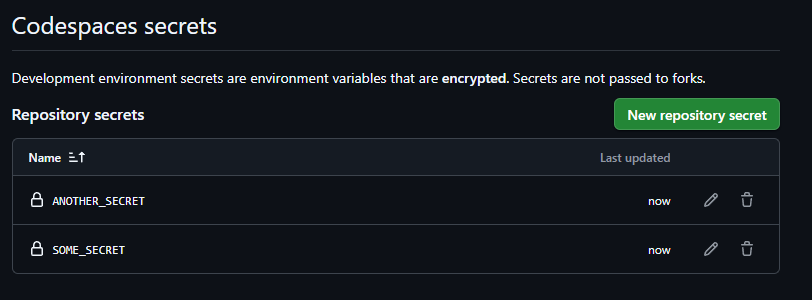
So this is safer, but not automatically safe.
Option 4: Developer Secret Managers
This is where I think many teams should move.
Instead of storing secrets in files, store them in a secret manager and inject them only when starting the app.
Example:
infisical run -- npm run devor:
doppler run -- npm run devor with an internal wrapper:
company-secrets run my-service dev -- npm run devThis gives a much better model:
no secrets in the repo
no secrets in local config files
team sharing is controlled
access can be revoked
audit logs are possible
rotation becomes easier
For small teams, tools like Infisical, Doppler, Bitwarden Secrets Manager, 1Password, or similar can work well.
For larger organizations, this is not only a developer convenience question. It becomes Platform Engineering:
How do developers get secrets safely?
How do we avoid copy-paste?
How do we rotate credentials?
How do we audit access?
How do we support AI coding agents?
How do we make the secure path the easiest path?
This is exactly the kind of boring platform problem that becomes very important at scale.
My current rule
I would separate secrets like this:
Fake local infrastructure credentials
→ OK in .env or docker-compose

Real external API keys
→ use secret manager or controlled injection

Cloud credentials
→ prefer managed identity, workload identity, short-lived tokens

Shared team credentials
→ never paste around, never keep in random local files

Agent-accessible workspaces
→ assume anything readable may end up in context/logs
The important part is not the tool.
The important part is the boundary.
A coding agent should be able to work with the codebase without casually reading the credentials of the business.
A better developer workflow
The workflow I would like to see is boring:
git clone repo
company-secrets login
company-secrets run my-service dev -- npm run devThe app gets what it needs.
The developer does not copy-paste secrets.
The agent does not need to read secret files.
Access is logged.
Tokens are scoped.
Rotation is not a crisis.
This does not need to be a huge enterprise product from day one. A good platform team can build a small internal version on top of existing cloud secret managers.
The goal is not to make developers slower.
The goal is to remove the stupid risk from the default path.
Final thought
Coding agents are not just autocomplete anymore.
They read files.
They run commands.
They inspect errors.
They change code.
They behave more like automation inside the development environment.
So we need to treat them as part of the security model.
The old advice was:
Do not commit secrets.
The new advice is closer to:
Do not put real secrets where your coding agent can casually read them.
That is a different standard.
And I think many local development setups are not ready for it yet.